
Surely you have already experienced the situation where information related to a recent conversation starts appearing on your mobile device. The feeling that our phone is spying on us is very common, and although it usually isn’t based on anything real, there are some occasions when it could indeed be happening.
In this article, I’ll provide you with details on the topic so you can rest assured.
Why do we feel like our phone is spying on us?
When we’re talking with someone, we often discuss topics that we’ve been thinking about for some time. It’s possible that we’ve done a Google search on the subject, or posted something on social media, or commented on the issue in a YouTube video. These actions allow the phone (primarily the browser) to know our interests and end up showing related information, either in the form of recommended news or advertisements.
You probably do always have the feeling that your phone listens to your conversations.
What can I do to prove that my phone isn’t listening to me?
If you still have doubts about the issue, you can conduct a simple experiment. Choose a new topic, away from your phone, don’t search for anything about the subject, just jot it down on paper. Then, turn on your phone without activating the assistant (neither Google nor Siri), and start talking about the topic for a few minutes. Do this for about three days. When choosing the topic, try to make it something different from your daily life. If you have a pet, don’t choose a topic about animals; if the holidays are approaching, don’t choose a topic about travel… that way, we’ll avoid coincidences.
You’ll see that the advertising isn’t related to what you’ve talked about, but if Easter is approaching and you’ve chosen something related to travel, it’s very likely that there will be ads about travel, but more because of the date than because of what you’ve said aloud to your phone.
I mention “without activating the assistant” because these assistants can indeed use the content of our messages to personalize our experience, either with news or with ads, so make sure you don’t have it turned on longer than usual.
If you still have doubts, you can always turn off the microphone on your phone. Remember that a few years ago, a bug was detected in Siri that allowed capturing fragmented user conversations for usage analysis, but that bug was fixed in due time, and at the moment, there are no ongoing issues in that regard.
What can I do if I’ve managed to prove that my phone is indeed listening to me?
If after the test you’ve demonstrated that it is listening to you, it’s possible that you have some app of suspicious origin installed on your phone. Check the list of apps and the permissions they have enabled. If a photo editing app has the microphone permission enabled, be suspicious, because that’s not normal.
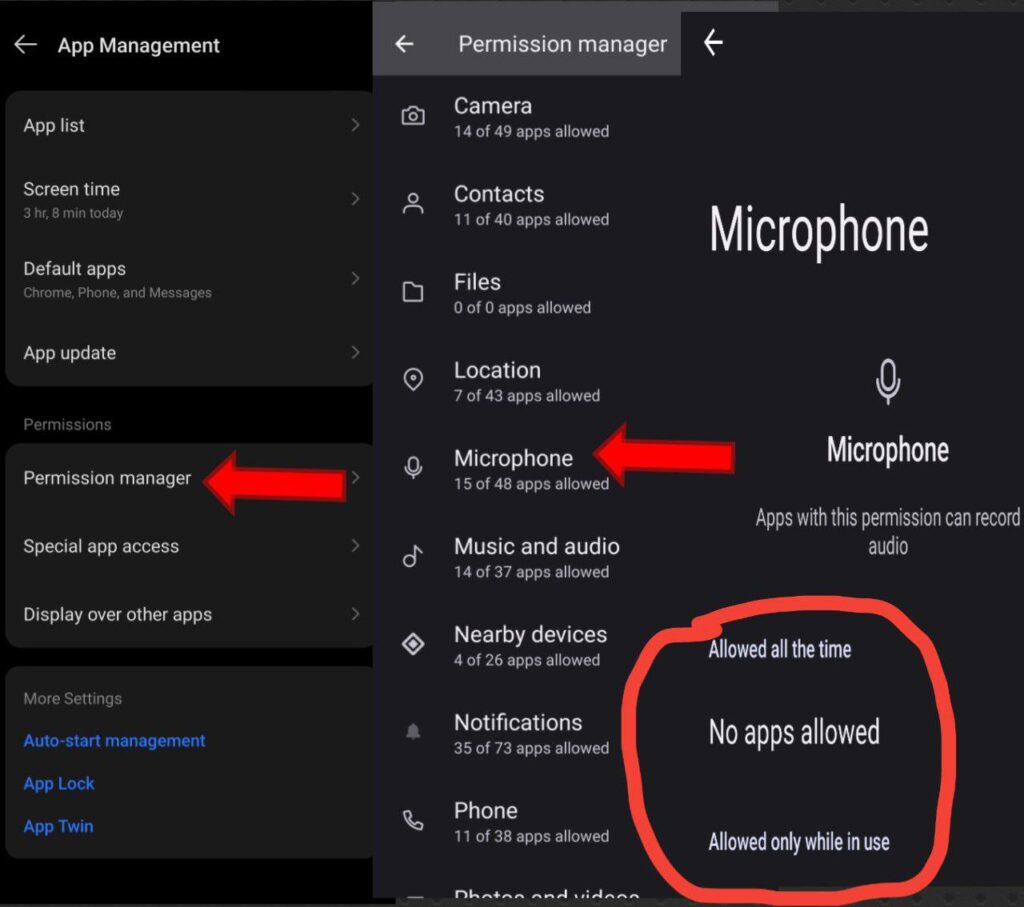
List of apps with access to my microphone:
On the mobile phone, we also have a list of the applications running in the background. If any of them have access to the microphone, they could activate it even if we are not running them.
You can simply do this by going to your phone settings, check on permission manager and then follow the steps on the image above.